目录
从随手拍到电商大片:基于ComfyUI+Qwen的全自动多视角AI生图工具
用手机随手拍一张产品照片,AI自动去除背景,再根据你的一句话提示词,批量生成5张不同视角的专业电商图。支持正面、侧面、俯视、特写、远景等28种视角自由组合,每张图片独立随机种子,CFG和步数可调。所有历史图片自动保存并瀑布流展示。本文手把手教你搭建这套全自动电商AI生图流水线。
📌 为什么需要这个工具?
电商运营中,产品图的质量直接影响点击率和转化率。传统拍摄 + 修图流程成本高、周期长,尤其当需要多角度展示产品时,拍摄成本成倍增加。
现有的AI生图工具(如Midjourney、Stable Diffusion)虽然强大,但需要复杂的提示词工程,且无法批量处理“去背景+场景融合”的完整流程。而ComfyUI作为节点式工作流工具,灵活强大但学习曲线陡峭。
本项目正是为了解决这些痛点而生:
- 一键去背景:上传随手拍,自动去除杂乱背景,保留纯净产品主体。
- 多视角批量生成:内置28种电商常用视角(正面、侧面、俯视、特写、远景等),用户可自动循环或手动勾选,一次生成最多5张不同角度的图片。
- 提示词即场景:用自然语言描述你想要的氛围(如“阳光沙滩背景,薄荷叶冰块”),AI自动融合。
- 全自动串联:后端无缝调用ComfyUI的两个工作流(去背景→图生图),无需人工干预。
- 历史管理:所有生成图片永久保存,瀑布流展示,支持下载和放大预览。
- 并发控制:全局最多同时处理10个请求,避免服务器过载。
🧰 技术架构
| 组件 | 技术 | 作用 |
|---|---|---|
| 前端 | HTML5 + CSS3 + JavaScript (ES6) | 上传图片、输入提示词、调节参数、展示结果 |
| 后端 | Flask + Flask-CORS | 接收请求、调用ComfyUI API、管理静态文件 |
| AI引擎 | ComfyUI + Qwen-Image-Edit | 去背景(RMBG-1.4)+ 图像编辑(4步Lightning加速) |
| 存储 | 本地文件系统 | 临时目录 + static/output 永久存档 |
工作流串联:
用户上传图片 → 上传至ComfyUI input → 运行去背景工作流 → 下载抠图 → 重新上传 → 运行图生图工作流(附加视角描述) → 保存到static/output → 返回图片URL
✨ 功能特点
- 多视角批量生成:28种精心设计的视角描述(正面平视、45度侧视、俯视、特写、远景、仰视、对角线构图等),用户可选择自动循环或手动勾选1~5个。
- 可调参数:CFG(提示词相关性,1.0
5.0)、步数(430),每张图片独立随机种子,确保差异明显。 - 实时进度反馈:生成过程显示进度条,完成后右侧网格一次性展示所有图片。
- 历史瀑布流:所有已生成图片按时间倒序排列,支持下载和点击放大。
- 并发安全:后端使用信号量限制同时处理请求数(默认10个),超出返回429。
- 全中文支持:Qwen模型原生理解中文提示词,无需翻译。
🛠️ 部署步骤(Windows / Linux 通用)
1. 环境准备
- Python 3.10+
- ComfyUI 服务已启动,并开启
--listen 0.0.0.0(允许API调用) - 安装依赖:
pip install flask flask_cors requests
2. 准备 ComfyUI 工作流文件
在ComfyUI界面中,开启 Enable Dev mode Options,分别导出两个API格式的工作流:
去背景.json:包含 LoadImage → easy imageRemBg → SaveImage
要求:LoadImage节点ID为"1"图生图.json:包含 Qwen-Image-Edit 完整流程
要求:LoadImage节点ID为"78";正面提示词节点ID为"435"(PrimitiveStringMultiline);负面提示词节点ID为"433:110"(TextEncodeQwenImageEditPlus);KSampler节点需支持动态修改种子、CFG、步数。
3. 下载后端代码
保存以下文件为 app.py(完整代码见文末附录)。
4. 创建前端模板
在项目根目录下创建 templates/index.html,粘贴完整前端代码(见文末附录)。
5. 修改配置
编辑 app.py 中的 COMFYUI_SERVER 为你的ComfyUI实际地址(例如 http://127.0.0.1:8180)。
6. 启动服务
bashpython app.py
浏览器访问 http://127.0.0.1:5000
📸 使用演示
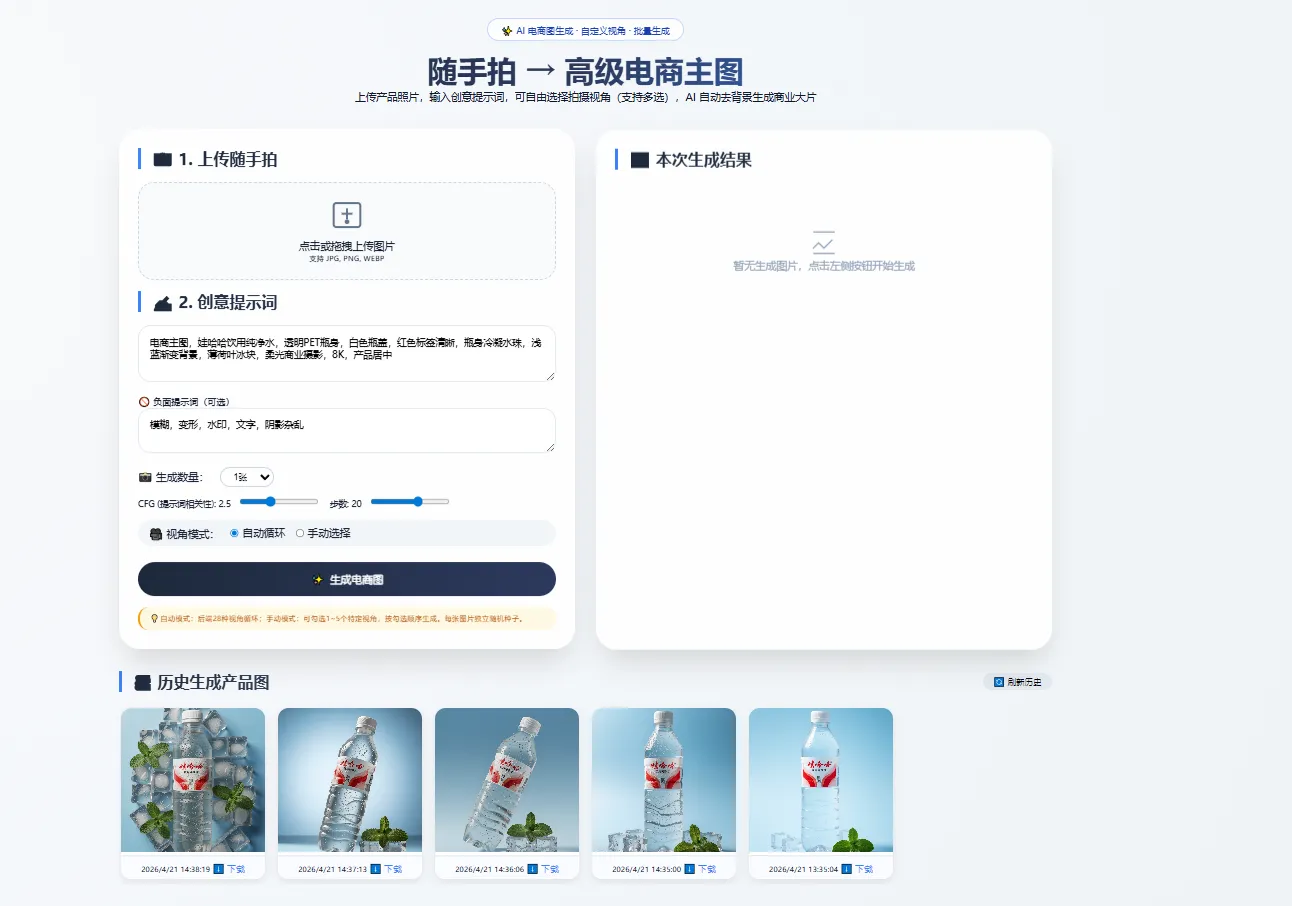
- 上传随手拍:点击或拖拽一张产品照片(支持JPG/PNG/WEBP)。
- 输入创意提示词:例如“透明纯净水瓶,阳光沙滩背景,薄荷叶冰块,8K超写实”。
- 调节参数:
- 生成数量:1~5张
- CFG:2.5(值越高越贴近提示词)
- 步数:20(越多细节越丰富)
- 选择视角模式:
- 自动循环:后端按28种视角顺序生成
- 手动选择:勾选你想要的特定视角(不超过生成数量)
- 点击生成:等待15~30秒,右侧网格会一次性展示所有生成图片,历史瀑布流自动刷新。
- 下载或放大:点击任意图片可全屏预览,点击下载按钮保存到本地。
🧩 核心代码解析
后端 – 多视角批量生成
pythonVIEW_ANGLES = [
    "正面平视视角,产品居中完整展示,无遮挡,清晰正面细节",
    "45度左侧视角,产品立体感强,清晰展示左侧轮廓与层次",
    # ... 共28个
]

@app.route('/api/generate', methods=['POST'])
def generate():
    batch = int(request.form.get('batch', 1))
    custom_angles = json.loads(request.form.get('custom_angles', '[]'))
    for i in range(batch):
        if custom_angles and i < len(custom_angles):
            view = custom_angles[i]
        else:
            view = VIEW_ANGLES[i % len(VIEW_ANGLES)]
        static_path = generate_single_image(..., view_angle=view, seed_offset=i)
        result_urls.append(url_for('serve_static_output', ...))
    return jsonify({"success": True, "imageUrls": result_urls})
后端 – 动态种子和参数覆盖
pythondef generate_single_image(..., seed_offset, cfg, steps):
    # ... 上传、去背景 ...
    for node_id, node in gen_workflow.items():
        if node.get("class_type") == "KSampler":
            new_seed = int(time.time() * 1000) + seed_offset
            node["inputs"]["seed"] = new_seed
            if cfg: node["inputs"]["cfg"] = cfg
            if steps: node["inputs"]["steps"] = steps
            break
    # ... 运行工作流 ...
前端 – 手动视角选择
javascriptfunction getSelectedAngles() {
    const checkboxes = document.querySelectorAll('#angleSelector input:checked');
    return Array.from(checkboxes).map(cb => VIEW_ANGLES[parseInt(cb.value)]);
}

// 限制勾选数量不超过batch
batchCountSelect.addEventListener('change', limitAngleSelection);
angleSelector.addEventListener('change', limitAngleSelection);
📊 效果对比
| 输入(随手拍) | 输出(AI 生成) |
|---|---|
| 桌面随意摆放的矿泉水瓶 | 浅蓝渐变背景 + 薄荷叶冰块 + 冷凝水珠(正面、侧面、俯视等多张) |
| 光线昏暗的耳机照片 | 极简白底 + 柔和商业光影 + 45度侧视构图 |
| 带杂乱背景的化妆品 | 大理石台面 + 自然侧光 + 局部微距特写 |
实际效果取决于提示词质量,Qwen对中文理解非常精准。
⚠️ 常见问题与解决
| 问题 | 解决方法 |
|---|---|
POST /api/generate 400 | 检查前端是否发送了 image 和 positive 字段 |
| 去背景失败 | 确保ComfyUI的 easy imageRemBg 能正常下载模型(需HuggingFace授权) |
| 图片无法显示 | 检查 static/output 目录权限,Flask是否正确提供静态路由 |
| 生成速度慢 | 使用Lightning LoRA并设置KSampler steps=4,cfg=1.0~2.0 |
| 视角不明显 | 降低CFG(如1.5)增加随机性,或手动选择更具体的视角描述 |
| 批量生成只出一张 | 确认前端 batch 参数正确传递给后端,且后端循环中 range(batch) 正常 |
🚧 后续优化方向
- 增加批量处理功能(一次上传多张图,批量生成)。
- 支持用户上传参考构图图片(ControlNet)。
- 添加图片编辑历史(撤销/重做)。
- 集成多用户系统,实现图片隔离。
- 异步任务队列(Celery)避免长时间阻塞。
🎁 总结
本项目提供了一套开箱即用的电商AI生图工具,将复杂的ComfyUI节点操作封装为简单的Web界面,并自动管理生成历史。无论是电商卖家、设计师还是AI爱好者,都可以快速搭建自己的“随手拍变大片”流水线。通过多视角批量生成、独立随机种子、可调CFG/步数等特性,显著提升出图差异性和可控性。
代码仓库:(没上传)
在线体验:(暂无,可自行部署)
如果你对ComfyUI工作流定制或前后端二次开发感兴趣,欢迎在评论区交流。
演示图
📎 附录:完整代码
由于篇幅限制,完整代码请访问我的GitHub仓库:[链接占位]
或直接复制以下关键文件:
app.py (后端,约300行)
python#!/usr/bin/env python3
"""
电商AI生图后端 - 支持用户自定义视角 + 批量生成 + 动态种子 + 可调CFG/步数
"""

import os
import json
import time
import shutil
import tempfile
import threading
import requests
from flask import Flask, request, jsonify, render_template, url_for, send_from_directory
from flask_cors import CORS
from werkzeug.utils import secure_filename

# ---------- 配置 ----------
COMFYUI_SERVER = "http://127.0.0.1:8188"   # 修改为您的 ComfyUI 地址
MATTE_WORKFLOW_FILE = "去背景.json"
GEN_WORKFLOW_FILE = "图生图.json"
TEMP_DIR = tempfile.mkdtemp(prefix="e2e_api_")
STATIC_OUTPUT_DIR = os.path.join(os.getcwd(), "static", "output")
os.makedirs(STATIC_OUTPUT_DIR, exist_ok=True)

ALLOWED_EXTENSIONS = {'png', 'jpg', 'jpeg', 'webp'}

# 全局并发限制
MAX_CONCURRENT = 10
semaphore = threading.Semaphore(MAX_CONCURRENT)

# 28个精心设计的视角(供用户选择)
VIEW_ANGLES = [
    "正面平视视角,产品居中完整展示,无遮挡,清晰正面细节",
    "45度左侧视角,产品立体感强,清晰展示左侧轮廓与层次",
    "正俯视垂直视角,从上往下垂直拍摄,展示产品顶部全貌",
    "斜俯视45度角,兼顾顶面与正面,层次丰富,电商常用角度",
    "局部细节特写,聚焦产品纹理、材质、logo或按键,微距质感",
    "边角特写,清晰展示产品边缘工艺、倒角与接缝细节",
    "功能区特写,突出产品按键、接口、开关等核心功能部位",
    "材质质感特写,强化光泽、磨砂、金属、皮革等表面质感",
    "包装正面特写,完整展示产品包装盒正面信息与设计",
    "低角度仰视,轻微仰拍,产品显得精致大气,视觉更高级",
    "高角度俯拍,略微倾斜俯视,展示整体形态与摆放关系",
    "极低角度仰拍,强调产品气场,适合轻奢、数码、家电类",
    "微仰视角,自然不夸张,突出产品正面与高度比例",
    "居中对称构图,极简留白,干净整洁,适合主图",
    "三分法构图,产品偏一侧,留白充足,适合详情页",
    "对角线构图,产品倾斜摆放,画面动感强,更有设计感",
    "浅景深构图,主体清晰锐利,背景轻微虚化,突出主体",
    "满屏构图,产品占满画面,视觉冲击力强,适合广告图",
    "搭配场景视角,产品与简约道具组合,生活化展示",
    "手持展示视角,模拟人手握持产品,真实使用场景",
    "平铺陈列视角,产品平放展示,适合服饰、配件、礼盒",
    "半侧面视角,介于正面与侧面之间,兼顾多面外观",
    "背视视角,清晰展示产品背面设计、接口或标识",
    "透视线构图,利用空间透视,增强空间感与高级感",
    "微动态倾斜视角,小角度旋转,自然灵动不呆板",
    "组合多件视角,多个产品有序摆放,展示套装或系列"
]

app = Flask(__name__)
CORS(app)

# ---------- 辅助函数 ----------
def allowed_file(filename):
    return '.' in filename and filename.rsplit('.', 1)[1].lower() in ALLOWED_EXTENSIONS

def upload_image_to_comfyui(local_path):
    url = f"{COMFYUI_SERVER}/upload/image"
    with open(local_path, "rb") as f:
        files = {"image": f}
        resp = requests.post(url, files=files)
    resp.raise_for_status()
    return resp.json().get("name")

def queue_prompt(workflow):
    url = f"{COMFYUI_SERVER}/prompt"
    resp = requests.post(url, json={"prompt": workflow})
    resp.raise_for_status()
    return resp.json()["prompt_id"]

def get_history(prompt_id, max_wait=120):
    url = f"{COMFYUI_SERVER}/history/{prompt_id}"
    start = time.time()
    while time.time() - start < max_wait:
        resp = requests.get(url)
        if resp.status_code == 200:
            data = resp.json()
            if prompt_id in data:
                return data[prompt_id]
        time.sleep(1)
    return None

def get_output_images(history):
    images = []
    outputs = history.get("outputs", {})
    for node_out in outputs.values():
        for img in node_out.get("images", []):
            images.append(img["filename"])
    return images

def download_image(filename, local_path):
    url = f"{COMFYUI_SERVER}/view?filename={filename}"
    resp = requests.get(url)
    resp.raise_for_status()
    with open(local_path, "wb") as f:
        f.write(resp.content)
    return local_path

def update_load_image_node(workflow, node_id, image_filename):
    if str(node_id) in workflow:
        workflow[str(node_id)]["inputs"]["image"] = image_filename
    else:
        raise ValueError(f"节点 {node_id} 不存在于工作流中")

def run_workflow(workflow_json, max_wait=120):
    prompt_id = queue_prompt(workflow_json)
    print(f"任务 ID: {prompt_id}")
    history = get_history(prompt_id, max_wait)
    if not history:
        raise TimeoutError("工作流执行超时")
    return get_output_images(history)

def generate_single_image(input_image_path, base_prompt, negative_prompt, view_angle="", seed_offset=0, cfg=None, steps=None):
    """
    生成单张图片,支持视角描述、独立种子、动态CFG/步数
    """
    base_prompt = base_prompt.strip()
    full_prompt = f"{base_prompt},{view_angle}" if view_angle else base_prompt
    print(f"  视角: {view_angle}")
    print(f"  提示词长度: {len(full_prompt)}")
    if len(full_prompt) > 2000:
        print("  ⚠️ 提示词过长,可能被截断")

    # 上传原始图片
    uploaded_name = upload_image_to_comfyui(input_image_path)

    # 去背景
    with open(MATTE_WORKFLOW_FILE, "r", encoding="utf-8") as f:
        matte_workflow = json.load(f)
    update_load_image_node(matte_workflow, "1", uploaded_name)
    matte_outputs = run_workflow(matte_workflow)
    if not matte_outputs:
        raise RuntimeError("去背景失败")
    matte_filename = matte_outputs[0]

    # 下载抠图
    local_matte = os.path.join(TEMP_DIR, f"matte_{int(time.time())}_{matte_filename}")
    download_image(matte_filename, local_matte)

    # 上传抠图
    uploaded_matte = upload_image_to_comfyui(local_matte)

    # 图生图
    with open(GEN_WORKFLOW_FILE, "r", encoding="utf-8") as f:
        gen_workflow = json.load(f)
    update_load_image_node(gen_workflow, "78", uploaded_matte)

    # 设置正面提示词(节点 435)
    if "435" in gen_workflow and gen_workflow["435"]["class_type"] == "PrimitiveStringMultiline":
        gen_workflow["435"]["inputs"]["value"] = full_prompt
    else:
        for node_id, node in gen_workflow.items():
            if node.get("class_type") == "CLIPTextEncode" and "positive" in node.get("_meta", {}).get("title", "").lower():
                gen_workflow[node_id]["inputs"]["text"] = full_prompt
                break

    # 设置负面提示词
    if negative_prompt:
        neg_node_id = "433:110"
        if neg_node_id in gen_workflow and gen_workflow[neg_node_id]["class_type"] == "TextEncodeQwenImageEditPlus":
            gen_workflow[neg_node_id]["inputs"]["prompt"] = negative_prompt
        else:
            for node_id, node in gen_workflow.items():
                if node.get("class_type") == "CLIPTextEncode" and "negative" in node.get("_meta", {}).get("title", "").lower():
                    gen_workflow[node_id]["inputs"]["text"] = negative_prompt
                    break

    # 修改 KSampler 参数(种子、CFG、步数)
    for node_id, node in gen_workflow.items():
        if node.get("class_type") == "KSampler":
            # 动态种子:基础种子 + 偏移量,确保每张不同
            current_seed = node["inputs"].get("seed", 0)
            if current_seed == 0 or current_seed == "randomize":
                new_seed = int(time.time() * 1000) + seed_offset
            else:
                new_seed = current_seed + seed_offset
            node["inputs"]["seed"] = new_seed
            print(f"  设置种子: {new_seed}")
            if cfg is not None:
                node["inputs"]["cfg"] = cfg
                print(f"  设置 CFG: {cfg}")
            if steps is not None:
                node["inputs"]["steps"] = steps
                print(f"  设置步数: {steps}")
            break

    final_outputs = run_workflow(gen_workflow)
    if not final_outputs:
        raise RuntimeError("图生图失败")
    final_filename = final_outputs[0]

    local_final = os.path.join(TEMP_DIR, f"final_{int(time.time())}_{final_filename}")
    download_image(final_filename, local_final)

    # 保存到静态目录
    static_filename = f"result_{int(time.time())}_{final_filename}"
    static_path = os.path.join(STATIC_OUTPUT_DIR, static_filename)
    shutil.copy2(local_final, static_path)
    return static_path

# ---------- 路由 ----------
@app.route('/')
def index():
    return render_template('index.html')

@app.route('/static/output/<path:filename>')
def serve_static_output(filename):
    return send_from_directory(STATIC_OUTPUT_DIR, filename)

@app.route('/api/list_outputs', methods=['GET'])
def list_outputs():
    try:
        files = []
        for f in os.listdir(STATIC_OUTPUT_DIR):
            if f.lower().endswith(('.png', '.jpg', '.jpeg', '.webp')):
                full_path = os.path.join(STATIC_OUTPUT_DIR, f)
                mtime = os.path.getmtime(full_path)
                files.append({
                    "filename": f,
                    "url": url_for('serve_static_output', filename=f, _external=True),
                    "mtime": mtime
                })
        files.sort(key=lambda x: x["mtime"], reverse=True)
        return jsonify({"success": True, "images": files})
    except Exception as e:
        return jsonify({"success": False, "error": str(e)}), 500

@app.route('/api/generate', methods=['POST'])
def generate():
    if not semaphore.acquire(blocking=False):
        return jsonify({"error": "服务器繁忙,当前处理请求已达上限,请稍后再试"}), 429
    try:
        if 'image' not in request.files:
            return jsonify({"error": "缺少 image 字段"}), 400
        file = request.files['image']
        if file.filename == '':
            return jsonify({"error": "未选择图片"}), 400
        if not allowed_file(file.filename):
            return jsonify({"error": "不支持的图片格式"}), 400

        positive = request.form.get('positive', '').strip()
        negative = request.form.get('negative', '').strip()
        if not positive:
            return jsonify({"error": "缺少 positive 提示词"}), 400

        # 批量数量(1-5)
        try:
            batch = int(request.form.get('batch', '1'))
        except:
            batch = 1
        batch = max(1, min(batch, 5))

        # 可选参数:CFG 和步数
        cfg = request.form.get('cfg', type=float)
        steps = request.form.get('steps', type=int)

        # 自定义视角(如果用户提供了)
        custom_angles_json = request.form.get('custom_angles', '')
        custom_angles = []
        if custom_angles_json:
            try:
                custom_angles = json.loads(custom_angles_json)
                if not isinstance(custom_angles, list):
                    custom_angles = []
            except:
                custom_angles = []
        # 限制数量不超过batch
        if len(custom_angles) > batch:
            custom_angles = custom_angles[:batch]

        filename = secure_filename(file.filename)
        temp_input = os.path.join(TEMP_DIR, f"input_{int(time.time())}_{filename}")
        file.save(temp_input)

        result_urls = []
        errors = []
        for i in range(batch):
            try:
                # 决定使用哪个视角
                if custom_angles and i < len(custom_angles):
                    view = custom_angles[i]
                else:
                    # 自动模式:循环使用默认列表
                    view = VIEW_ANGLES[i % len(VIEW_ANGLES)]
                print(f"\n--- 开始生成第 {i+1} 张,视角: {view} ---")
                static_path = generate_single_image(
                    temp_input, positive, negative,
                    view_angle=view, seed_offset=i,
                    cfg=cfg, steps=steps
                )
                url = url_for('serve_static_output', filename=os.path.basename(static_path), _external=True)
                result_urls.append(url)
            except Exception as e:
                errors.append(f"第{i+1}张生成失败: {str(e)}")
                print(f"❌ 第{i+1}张失败: {e}")

        if os.path.exists(temp_input):
            os.remove(temp_input)

        if result_urls:
            return jsonify({"success": True, "imageUrls": result_urls, "errors": errors})
        else:
            return jsonify({"error": "所有图片生成失败", "details": errors}), 500
    finally:
        semaphore.release()

if __name__ == '__main__':
    print(f"临时目录: {TEMP_DIR}")
    print(f"静态输出目录: {STATIC_OUTPUT_DIR}")
    print(f"最大并发数: {MAX_CONCURRENT}")
    print(f"视角列表长度: {len(VIEW_ANGLES)}")
    app.run(host='0.0.0.0', port=5000, debug=False)
templates/index.html (前端,约600行)
html<!DOCTYPE html>
<html lang="zh-CN">
<head>
<meta charset="UTF-8">
<meta name="viewport" content="width=device-width, initial-scale=1.0, user-scalable=yes">
<title>电商AI生图工具 | 自定义视角批量生成</title>
<style>
* {
margin: 0;
padding: 0;
box-sizing: border-box;
}
body {
font-family: 'Inter', system-ui, -apple-system, 'Segoe UI', Roboto, sans-serif;
background: radial-gradient(circle at 10% 20%, #f8fafc 0%, #eef2f6 100%);
min-height: 100vh;
padding: 2rem 1rem;
color: #0f172a;
}
.container {
max-width: 1400px;
margin: 0 auto;
}
.hero {
text-align: center;
margin-bottom: 2.5rem;
}
.hero h1 {
font-size: 2.8rem;
font-weight: 800;
background: linear-gradient(135deg, #1e293b, #2d3a5e, #3b82f6);
background-clip: text;
-webkit-background-clip: text;
color: transparent;
animation: shimmer 4s infinite;
}
@keyframes shimmer {
0% { background-position: 0% 50%; }
50% { background-position: 100% 50%; }
100% { background-position: 0% 50%; }
}
.badge {
display: inline-flex;
background: rgba(255,255,255,0.9);
backdrop-filter: blur(8px);
padding: 0.4rem 1.2rem;
border-radius: 60px;
font-size: 0.85rem;
color: #1e40af;
border: 1px solid rgba(59,130,246,0.3);
margin-bottom: 1rem;
}
.top-section {
display: grid;
grid-template-columns: 1fr 1fr;
gap: 2rem;
margin-bottom: 2rem;
}
@media (max-width: 900px) {
.top-section {
grid-template-columns: 1fr;
gap: 1.5rem;
}
}
.card {
background: rgba(255,255,255,0.9);
backdrop-filter: blur(12px);
border-radius: 2rem;
padding: 1.8rem;
box-shadow: 0 25px 45px -12px rgba(0,0,0,0.15);
transition: all 0.3s;
}
.card:hover {
transform: translateY(-4px);
background: rgba(255,255,255,0.96);
}
.card h2 {
font-size: 1.5rem;
font-weight: 700;
margin-bottom: 1.2rem;
border-left: 5px solid #3b82f6;
padding-left: 1rem;
background: linear-gradient(120deg, #1e293b, #334155);
background-clip: text;
-webkit-background-clip: text;
color: transparent;
}
.upload-area {
border: 2px dashed #cbd5e1;
border-radius: 1.5rem;
background: #f8fafc;
padding: 1.5rem;
text-align: center;
cursor: pointer;
transition: all 0.25s;
margin-bottom: 1rem;
}
.upload-area:hover {
border-color: #3b82f6;
background: #eff6ff;
}
.upload-area img {
max-width: 100%;
max-height: 240px;
border-radius: 1rem;
object-fit: contain;
}
.preview-img {
margin-top: 0.5rem;
font-size: 0.85rem;
color: #475569;
}
.prompt-input {
width: 100%;
padding: 0.9rem 1rem;
border-radius: 1.2rem;
border: 1px solid #e2e8f0;
background: white;
font-size: 0.9rem;
font-family: inherit;
resize: vertical;
transition: 0.2s;
}
.prompt-input:focus {
outline: none;
border-color: #3b82f6;
box-shadow: 0 0 0 3px rgba(59,130,246,0.15);
}
.negative-input {
margin-top: 0.8rem;
}
.batch-selector {
margin-top: 1rem;
display: flex;
align-items: center;
gap: 1rem;
flex-wrap: wrap;
}
.batch-selector select {
padding: 0.4rem 1rem;
border-radius: 2rem;
border: 1px solid #cbd5e1;
background: white;
}
.param-row {
display: flex;
gap: 1rem;
margin-top: 0.8rem;
flex-wrap: wrap;
}
.param-row label {
font-size: 0.8rem;
font-weight: 500;
}
.param-row input {
width: 120px;
margin-left: 0.5rem;
}
.mode-switch {
margin-top: 1rem;
display: flex;
align-items: center;
gap: 1rem;
background: #f1f5f9;
padding: 0.5rem 1rem;
border-radius: 2rem;
}
.mode-switch label {
display: flex;
align-items: center;
gap: 0.3rem;
cursor: pointer;
}
.angle-selector {
margin-top: 0.8rem;
max-height: 200px;
overflow-y: auto;
border: 1px solid #e2e8f0;
border-radius: 1rem;
padding: 0.5rem;
background: white;
display: none;
}
.angle-checkbox {
display: flex;
align-items: center;
gap: 0.5rem;
padding: 0.3rem 0.5rem;
font-size: 0.8rem;
}
.angle-checkbox input {
width: 16px;
height: 16px;
}
.btn-generate {
background: linear-gradient(105deg, #1e293b, #2d3a5e);
color: white;
border: none;
padding: 0.9rem 1.5rem;
border-radius: 3rem;
font-weight: 600;
font-size: 1rem;
cursor: pointer;
width: 100%;
margin-top: 1.5rem;
transition: 0.2s;
display: flex;
align-items: center;
justify-content: center;
gap: 0.5rem;
}
.btn-generate:disabled {
opacity: 0.7;
cursor: not-allowed;
}
.progress-area {
margin-top: 1.2rem;
background: #e2e8f0;
border-radius: 2rem;
overflow: hidden;
display: none;
}
.progress-bar {
width: 0%;
height: 6px;
background: linear-gradient(90deg, #3b82f6, #1e40af);
transition: width 0.3s ease;
}
.progress-text {
text-align: center;
font-size: 0.75rem;
margin-top: 0.4rem;
color: #2563eb;
}
.right-result-area {
min-height: 300px;
display: flex;
flex-direction: column;
}
.right-result-grid {
display: grid;
grid-template-columns: repeat(auto-fill, minmax(160px, 1fr));
gap: 1rem;
}
.right-result-item {
background: white;
border-radius: 1rem;
overflow: hidden;
box-shadow: 0 4px 10px rgba(0,0,0,0.08);
cursor: pointer;
transition: 0.2s;
}
.right-result-item:hover {
transform: translateY(-2px);
box-shadow: 0 8px 18px rgba(0,0,0,0.12);
}
.right-result-item img {
width: 100%;
aspect-ratio: 1 / 1;
object-fit: cover;
}
.right-result-info {
padding: 0.4rem;
font-size: 0.7rem;
text-align: center;
background: #fafcff;
}
.right-result-info button {
background: none;
border: none;
color: #3b82f6;
cursor: pointer;
font-size: 0.7rem;
}
.empty-right {
display: flex;
align-items: center;
justify-content: center;
height: 200px;
color: #94a3b8;
text-align: center;
flex-direction: column;
}
.loading {
display: inline-flex;
align-items: center;
gap: 0.5rem;
background: #eef2ff;
padding: 0.5rem 1rem;
border-radius: 2rem;
font-size: 0.8rem;
color: #2563eb;
}
.spinner {
width: 18px;
height: 18px;
border: 2px solid #bfdbfe;
border-top-color: #2563eb;
border-radius: 50%;
animation: spin 0.6s linear infinite;
}
@keyframes spin {
to { transform: rotate(360deg); }
}
.bottom-section {
margin-top: 1rem;
}
.history-header {
display: flex;
justify-content: space-between;
align-items: center;
margin-bottom: 1rem;
}
.history-header h2 {
font-size: 1.5rem;
font-weight: 700;
border-left: 5px solid #3b82f6;
padding-left: 1rem;
background: linear-gradient(120deg, #1e293b, #334155);
background-clip: text;
-webkit-background-clip: text;
color: transparent;
}
.refresh-btn {
background: #e2e8f0;
border: none;
border-radius: 2rem;
padding: 0.3rem 1rem;
font-size: 0.8rem;
cursor: pointer;
}
.waterfall-grid {
display: grid;
grid-template-columns: repeat(auto-fill, minmax(200px, 1fr));
gap: 1.2rem;
max-height: 500px;
overflow-y: auto;
padding: 0.5rem 0.2rem;
}
.waterfall-item {
background: white;
border-radius: 1rem;
overflow: hidden;
box-shadow: 0 6px 14px rgba(0,0,0,0.08);
transition: 0.2s;
cursor: pointer;
}
.waterfall-item:hover {
transform: translateY(-4px);
box-shadow: 0 12px 22px rgba(0,0,0,0.12);
}
.waterfall-item img {
width: 100%;
aspect-ratio: 1 / 1;
object-fit: cover;
background: #f1f5f9;
}
.item-info {
padding: 0.5rem;
font-size: 0.7rem;
text-align: center;
border-top: 1px solid #e2e8f0;
background: #fafcff;
}
.item-info button {
background: none;
border: none;
color: #3b82f6;
cursor: pointer;
}
.empty-state {
text-align: center;
padding: 2rem;
color: #94a3b8;
}
.api-hint {
background: #fef9e3;
border-radius: 1rem;
padding: 0.6rem 1rem;
font-size: 0.7rem;
margin-top: 1rem;
color: #b45309;
border-left: 3px solid #f59e0b;
}
.footer {
text-align: center;
margin-top: 2rem;
font-size: 0.75rem;
color: #64748b;
border-top: 1px solid rgba(0,0,0,0.05);
padding-top: 1rem;
}
.modal {
display: none;
position: fixed;
z-index: 1000;
left: 0;
top: 0;
width: 100%;
height: 100%;
background-color: rgba(0,0,0,0.9);
justify-content: center;
align-items: center;
}
.modal img {
max-width: 90%;
max-height: 90%;
border-radius: 1rem;
}
.modal-close {
position: absolute;
top: 20px;
right: 35px;
color: #fff;
font-size: 40px;
cursor: pointer;
}
</style>
</head>
<body>
<div class="container">
<div class="hero">
<div class="badge">✨ AI 电商图生成 · 自定义视角 · 批量生成</div>
<h1>随手拍 → 高级电商主图</h1>
<p>上传产品照片,输入创意提示词,可自由选择拍摄视角(支持多选),AI 自动去背景生成商业大片</p>
</div>
<div class="top-section">
<!-- 左侧:输入区 -->
<div class="card">
<h2>📸 1. 上传随手拍</h2>
<div id="dropzone" class="upload-area" onclick="document.getElementById('fileInput').click()">
<input type="file" id="fileInput" accept="image/jpeg,image/png,image/webp" style="display: none;">
<div id="uploadPreview">
<svg width="48" height="48" viewBox="0 0 24 24" fill="none" stroke="#64748b" stroke-width="1.5" style="margin: 0 auto 0.5rem;">
<rect x="2" y="3" width="20" height="18" rx="2" ry="2"></rect>
<line x1="8" y1="11" x2="16" y2="11"></line>
<line x1="12" y1="7" x2="12" y2="15"></line>
<circle cx="12" cy="17" r="1"></circle>
</svg>
<p style="font-weight:500;">点击或拖拽上传图片</p>
<p style="font-size:0.7rem;">支持 JPG, PNG, WEBP</p>
</div>
<img id="previewImage" style="display: none; max-width:100%; border-radius: 1rem;">
</div>
<div class="preview-img" id="fileName"></div>
<h2 style="margin-top: 1rem;">✍️ 2. 创意提示词</h2>
<textarea id="positivePrompt" class="prompt-input" rows="3" placeholder="例:电商主图,透明纯净水瓶,阳光沙滩背景,薄荷叶冰块,8K超写实"></textarea>
<div class="negative-input">
<label style="font-weight:500; font-size:0.85rem;">🚫 负面提示词(可选)</label>
<textarea id="negativePrompt" class="prompt-input" rows="2" placeholder="模糊,变形,水印"></textarea>
</div>
<div class="batch-selector">
<span>📸 生成数量:</span>
<select id="batchCount">
<option value="1">1张</option>
<option value="2">2张</option>
<option value="3">3张</option>
<option value="4">4张</option>
<option value="5">5张</option>
</select>
</div>
<div class="param-row">
<div>
<label>CFG (提示词相关性): <span id="cfgValue">2.5</span></label>
<input type="range" id="cfgSlider" min="1.0" max="5.0" step="0.1" value="2.5">
</div>
<div>
<label>步数: <span id="stepsValue">20</span></label>
<input type="range" id="stepsSlider" min="4" max="30" step="1" value="20">
</div>
</div>
<!-- 视角模式切换 -->
<div class="mode-switch">
<span>🎥 视角模式:</span>
<label>
<input type="radio" name="viewMode" value="auto" checked> 自动循环
</label>
<label>
<input type="radio" name="viewMode" value="manual"> 手动选择
</label>
</div>
<div id="angleSelector" class="angle-selector">
<!-- 动态生成28个复选框 -->
</div>
<button id="generateBtn" class="btn-generate"><span>✨</span> 生成电商图</button>
<div id="progressArea" class="progress-area">
<div class="progress-bar" id="progressBar"></div>
<div class="progress-text" id="progressText">准备就绪</div>
</div>
<div class="api-hint">💡 自动模式:后端28种视角循环;手动模式:可勾选1~5个特定视角,按勾选顺序生成。每张图片独立随机种子。</div>
</div>
<!-- 右侧:本次生成结果 -->
<div class="card">
<h2>🖼️ 本次生成结果</h2>
<div id="rightResultArea" class="right-result-area">
<div class="empty-right">
<svg width="48" height="48" viewBox="0 0 24 24" fill="none" stroke="currentColor" stroke-width="1">
<path d="M4 16l4-4 4 4 6-6" stroke="currentColor" stroke-linecap="round"/>
<path d="M4 20h16" stroke="currentColor"/>
<path d="M4 4h16" stroke="currentColor"/>
</svg>
<p>暂无生成图片,点击左侧按钮开始生成</p>
</div>
</div>
</div>
</div>
<!-- 下半部分:历史图片瀑布流 -->
<div class="bottom-section">
<div class="history-header">
<h2>📚 历史生成产品图</h2>
<button id="refreshHistoryBtn" class="refresh-btn">🔄 刷新历史</button>
</div>
<div id="waterfallContainer" class="waterfall-grid">
<div class="empty-state">加载中...</div>
</div>
</div>
<div class="footer">⚡ 基于 ComfyUI + Qwen-Image-Edit | 支持批量生成 | 自定义视角 | 可调CFG/步数</div>
</div>
<!-- 图片预览模态框 -->
<div id="imageModal" class="modal" onclick="closeModal()">
<span class="modal-close">×</span>
<img id="modalImage" src="">
</div>
<script>
// API 端点
const API_ENDPOINT = "/api/generate";
const LIST_API = "/api/list_outputs";
// 28个视角列表(与后端保持一致)
const VIEW_ANGLES = [
"正面平视视角,产品居中完整展示,无遮挡,清晰正面细节",
"45度左侧视角,产品立体感强,清晰展示左侧轮廓与层次",
"正俯视垂直视角,从上往下垂直拍摄,展示产品顶部全貌",
"斜俯视45度角,兼顾顶面与正面,层次丰富,电商常用角度",
"局部细节特写,聚焦产品纹理、材质、logo或按键,微距质感",
"边角特写,清晰展示产品边缘工艺、倒角与接缝细节",
"功能区特写,突出产品按键、接口、开关等核心功能部位",
"材质质感特写,强化光泽、磨砂、金属、皮革等表面质感",
"包装正面特写,完整展示产品包装盒正面信息与设计",
"低角度仰视,轻微仰拍,产品显得精致大气,视觉更高级",
"高角度俯拍,略微倾斜俯视,展示整体形态与摆放关系",
"极低角度仰拍,强调产品气场,适合轻奢、数码、家电类",
"微仰视角,自然不夸张,突出产品正面与高度比例",
"居中对称构图,极简留白,干净整洁,适合主图",
"三分法构图,产品偏一侧,留白充足,适合详情页",
"对角线构图,产品倾斜摆放,画面动感强,更有设计感",
"浅景深构图,主体清晰锐利,背景轻微虚化,突出主体",
"满屏构图,产品占满画面,视觉冲击力强,适合广告图",
"搭配场景视角,产品与简约道具组合,生活化展示",
"手持展示视角,模拟人手握持产品,真实使用场景",
"平铺陈列视角,产品平放展示,适合服饰、配件、礼盒",
"半侧面视角,介于正面与侧面之间,兼顾多面外观",
"背视视角,清晰展示产品背面设计、接口或标识",
"透视线构图,利用空间透视,增强空间感与高级感",
"微动态倾斜视角,小角度旋转,自然灵动不呆板",
"组合多件视角,多个产品有序摆放,展示套装或系列"
];
// DOM 元素
const fileInput = document.getElementById('fileInput');
const dropzone = document.getElementById('dropzone');
const previewImg = document.getElementById('previewImage');
const uploadPreviewDiv = document.getElementById('uploadPreview');
const fileNameSpan = document.getElementById('fileName');
const positiveInput = document.getElementById('positivePrompt');
const negativeInput = document.getElementById('negativePrompt');
const generateBtn = document.getElementById('generateBtn');
const progressArea = document.getElementById('progressArea');
const progressBar = document.getElementById('progressBar');
const progressText = document.getElementById('progressText');
const rightResultArea = document.getElementById('rightResultArea');
const waterfallContainer = document.getElementById('waterfallContainer');
const refreshHistoryBtn = document.getElementById('refreshHistoryBtn');
const cfgSlider = document.getElementById('cfgSlider');
const cfgValue = document.getElementById('cfgValue');
const stepsSlider = document.getElementById('stepsSlider');
const stepsValue = document.getElementById('stepsValue');
const angleSelector = document.getElementById('angleSelector');
const viewModeRadios = document.querySelectorAll('input[name="viewMode"]');
const batchCountSelect = document.getElementById('batchCount');
let selectedFile = null;
// 生成视角复选框
function buildAngleCheckboxes() {
angleSelector.innerHTML = '';
VIEW_ANGLES.forEach((angle, idx) => {
const div = document.createElement('div');
div.className = 'angle-checkbox';
div.innerHTML = `
<input type="checkbox" value="${idx}" id="angle_${idx}">
<label for="angle_${idx}">${angle}</label>
`;
angleSelector.appendChild(div);
});
}
buildAngleCheckboxes();
// 模式切换:显示/隐藏视角选择器
viewModeRadios.forEach(radio => {
radio.addEventListener('change', () => {
if (document.querySelector('input[name="viewMode"]:checked').value === 'manual') {
angleSelector.style.display = 'block';
} else {
angleSelector.style.display = 'none';
}
});
});
angleSelector.style.display = 'none'; // 初始隐藏
// 限制勾选数量不超过生成数量
function limitAngleSelection() {
const batch = parseInt(batchCountSelect.value);
const checkboxes = document.querySelectorAll('#angleSelector input[type="checkbox"]');
let checkedCount = 0;
checkboxes.forEach(cb => { if (cb.checked) checkedCount++; });
if (checkedCount > batch) {
alert(`最多只能勾选 ${batch} 个视角(与生成数量一致)`);
// 从后往前取消最后一个勾选的
for (let i = checkboxes.length-1; i >= 0; i--) {
if (checkboxes[i].checked) {
checkboxes[i].checked = false;
break;
}
}
}
}
batchCountSelect.addEventListener('change', limitAngleSelection);
angleSelector.addEventListener('change', limitAngleSelection);
// 获取选中的视角(返回字符串数组)
function getSelectedAngles() {
const checkboxes = document.querySelectorAll('#angleSelector input[type="checkbox"]');
const selected = [];
checkboxes.forEach(cb => {
if (cb.checked) {
const idx = parseInt(cb.value);
selected.push(VIEW_ANGLES[idx]);
}
});
return selected;
}
// 滑块显示值
cfgSlider.addEventListener('input', () => { cfgValue.innerText = cfgSlider.value; });
stepsSlider.addEventListener('input', () => { stepsValue.innerText = stepsSlider.value; });
// 加载历史图片
async function loadHistory() {
try {
waterfallContainer.innerHTML = '<div class="empty-state">加载中...</div>';
const resp = await fetch(LIST_API);
const data = await resp.json();
if (!data.success) throw new Error(data.error);
const images = data.images || [];
if (images.length === 0) {
waterfallContainer.innerHTML = '<div class="empty-state">✨ 暂无生成图片,上传一张随手拍开始创作吧</div>';
return;
}
renderWaterfall(images);
} catch (err) {
waterfallContainer.innerHTML = `<div class="empty-state">❌ 加载失败: ${err.message}</div>`;
}
}
function renderWaterfall(images) {
waterfallContainer.innerHTML = '';
for (const img of images) {
const item = document.createElement('div');
item.className = 'waterfall-item';
item.innerHTML = `
<img src="${img.url}" alt="产品图" loading="lazy">
<div class="item-info">
<span>${new Date(img.mtime * 1000).toLocaleString()}</span>
<button class="download-single" data-url="${img.url}" data-filename="${img.filename}">⬇️ 下载</button>
</div>
`;
item.querySelector('img').addEventListener('click', () => openModal(img.url));
const downloadBtn = item.querySelector('.download-single');
downloadBtn.addEventListener('click', (e) => {
e.stopPropagation();
const a = document.createElement('a');
a.href = img.url;
a.download = img.filename;
a.click();
});
waterfallContainer.appendChild(item);
}
}
function openModal(url) {
const modal = document.getElementById('imageModal');
const modalImg = document.getElementById('modalImage');
modal.style.display = 'flex';
modalImg.src = url;
}
function closeModal() {
document.getElementById('imageModal').style.display = 'none';
}
// 处理图片上传预览
function handleFile(file) {
if (!file || !file.type.startsWith('image/')) {
alert('请选择图片文件');
return false;
}
selectedFile = file;
const reader = new FileReader();
reader.onload = (e) => {
previewImg.src = e.target.result;
previewImg.style.display = 'block';
uploadPreviewDiv.style.display = 'none';
fileNameSpan.innerText = `✅ 已选: ${file.name}`;
};
reader.readAsDataURL(file);
return true;
}
fileInput.addEventListener('change', (e) => {
if (e.target.files.length) handleFile(e.target.files[0]);
});
// 拖拽上传
dropzone.addEventListener('dragover', (e) => {
e.preventDefault();
dropzone.style.borderColor = '#3b82f6';
dropzone.style.background = '#eff6ff';
});
dropzone.addEventListener('dragleave', (e) => {
e.preventDefault();
dropzone.style.borderColor = '#cbd5e1';
dropzone.style.background = '#f8fafc';
});
dropzone.addEventListener('drop', (e) => {
e.preventDefault();
dropzone.style.borderColor = '#cbd5e1';
dropzone.style.background = '#f8fafc';
const file = e.dataTransfer.files[0];
if (file) handleFile(file);
});
// 批量生成(单次请求,携带视角参数)
async function batchGenerate(positive, negative, imageFile, total, cfg, steps, customAngles) {
const formData = new FormData();
formData.append('image', imageFile);
formData.append('positive', positive);
if (negative) formData.append('negative', negative);
formData.append('batch', total.toString());
if (cfg !== undefined && cfg !== null) formData.append('cfg', cfg);
if (steps !== undefined && steps !== null) formData.append('steps', steps);
if (customAngles && customAngles.length > 0) {
formData.append('custom_angles', JSON.stringify(customAngles));
}
rightResultArea.innerHTML = '<div class="empty-right"><div class="loading"><div class="spinner"></div> 生成中,请耐心等待(每张约15-30秒)...</div></div>';
const response = await fetch(API_ENDPOINT, {
method: 'POST',
body: formData,
});
if (!response.ok) {
const errText = await response.text();
throw new Error(`API 错误 ${response.status}: ${errText}`);
}
const data = await response.json();
if (data.success && data.imageUrls && data.imageUrls.length > 0) {
updateRightResult(data.imageUrls);
return data.imageUrls;
} else {
throw new Error(data.error || '生成失败');
}
}
function updateRightResult(imageUrls) {
if (!imageUrls || imageUrls.length === 0) {
rightResultArea.innerHTML = `<div class="empty-right"><p>暂无生成图片</p></div>`;
return;
}
let html = `<div class="right-result-grid">`;
for (let url of imageUrls) {
html += `
<div class="right-result-item">
<img src="${url}" alt="生成图片" onclick="openModal('${url}')">
<div class="right-result-info">
<button class="download-right" data-url="${url}">⬇️ 下载</button>
</div>
</div>
`;
}
html += `</div>`;
rightResultArea.innerHTML = html;
document.querySelectorAll('.download-right').forEach(btn => {
btn.addEventListener('click', (e) => {
e.stopPropagation();
const url = btn.getAttribute('data-url');
const a = document.createElement('a');
a.href = url;
a.download = url.split('/').pop();
a.click();
});
});
}
// 主生成流程
async function generateImage() {
if (!selectedFile) {
alert('请先上传一张随手拍图片');
return;
}
const positive = positiveInput.value.trim();
if (!positive) {
alert('请输入正面提示词');
return;
}
const negative = negativeInput.value.trim();
const batchCount = parseInt(batchCountSelect.value);
const cfg = parseFloat(cfgSlider.value);
const steps = parseInt(stepsSlider.value);
const viewMode = document.querySelector('input[name="viewMode"]:checked').value;
let customAngles = [];
if (viewMode === 'manual') {
customAngles = getSelectedAngles();
if (customAngles.length === 0) {
alert('请至少勾选一个视角');
return;
}
if (customAngles.length > batchCount) {
alert(`勾选的视角数量(${customAngles.length})超过生成数量(${batchCount}),请减少或增加生成数量`);
return;
}
}
progressArea.style.display = 'block';
progressBar.style.width = '0%';
progressText.innerText = '生成中,请耐心等待...';
generateBtn.disabled = true;
generateBtn.innerHTML = '<span>⏳</span> 生成中...';
try {
const imageUrls = await batchGenerate(positive, negative, selectedFile, batchCount, cfg, steps, customAngles);
progressBar.style.width = '100%';
progressText.innerText = `✅ 生成完成!共 ${imageUrls.length} 张`;
await loadHistory(); // 刷新历史瀑布流
} catch (err) {
console.error(err);
alert(`生成失败: ${err.message}`);
progressText.innerText = `❌ 生成失败: ${err.message}`;
} finally {
generateBtn.disabled = false;
generateBtn.innerHTML = '<span>✨</span> 生成电商图';
setTimeout(() => {
if (progressText.innerText.includes('完成') || progressText.innerText.includes('失败')) {
progressArea.style.display = 'none';
}
}, 5000);
}
}
generateBtn.addEventListener('click', generateImage);
refreshHistoryBtn.addEventListener('click', loadHistory);
// 初始化提示词示例
if (!positiveInput.value) {
positiveInput.value = "电商主图,娃哈哈饮用纯净水,透明PET瓶身,白色瓶盖,红色标签清晰,瓶身冷凝水珠,浅蓝渐变背景,薄荷叶冰块,柔光商业摄影,8K,产品居中";
negativeInput.value = "模糊,变形,水印,文字,阴影杂乱";
}
// 加载历史
loadHistory();
</script>
</body>
</html>
本文所涉及的所有代码、工作流JSON模板,均可在我的博客资源页下载。
转发请注明出处。
写在最后:AI生成图像的质量高度依赖提示词工程和模型选择,建议多尝试不同的视角描述和参数组合。如果你有更好的视角列表或优化思路,欢迎分享!
本文作者:苏皓明
本文链接:
版权声明:本博客所有文章除特别声明外,均采用 BY-NC-SA 许可协议。转载请注明出处!